

102.3. How to get started with PyVO using SODA#
For the API Aspect of the Rubin Science Platform at data.lsst.cloud.
Data Release: DP1
Last verified to run: 2026-03-17
Learning objective: Create image cutouts from Rubin DP1 images using the Server-side Operations for Data Access (SODA) protocol with PyVO from a Python environment.
LSST data products: DP1 image cutouts accessed via the Rubin Science Platform SODA service.
Credit: Developed by Andrés A. Plazas Malagón and the Rubin Community Science Team (CST), and based on tutorials developed by the CST. Please consider acknowledging them if this tutorial is used for the preparation of journal articles, software releases, or other tutorials.
Get Support: Everyone is encouraged to ask questions or raise issues in the Support Category of the Rubin Community Forum. Rubin staff will respond to all questions posted there.
Introduction#
This tutorial demonstrates how to create image cutouts from Rubin DP1 data programmatically using the API Aspect of the Rubin Science Platform. The tutorial uses the Python Virtual Observatory (PyVO) package to authenticate with the Rubin SODA cutout service and request spatial cutouts of images.
SODA is a protocol of the International Virtual Observatory Alliance (IVOA) that provides server-side data processing capabilities, including spatial and spectral cutouts. Learn more in the IVOA SODA documentation.
The Rubin SODA cutout service supports three service types that control how much image data is returned:
cutout-sync: Returns the image pixels with a WCS and the primary header. This is the default and is sufficient for most use cases.cutout-sync-maskedimage: Returns the image pixels, WCS, and the primary header, plus the mask and variance planes.cutout-sync-exposure: Returns the full set of image extensions, including the PSF and provenance planes. This is most useful within the RSP Notebook Aspect where thelsst.afwpackage can read the result as anExposureFobject (see 103.4. Cutout exposures).
The default cutout-sync mode improves performance by reducing data transfer, particularly for deep coadd images where the PSF and provenance planes can significantly increase the size of the results.
This workflow is suitable for users who prefer scripted or automated access to Rubin data from a local Python environment or from cloud-based environments such as Google Colab. Familiarity with basic Python syntax is assumed.
Related tutorials describe full image downloads via SIA (102.2. How to get started with PyVO using SIA) and catalog access via TAP (102.1. How to get started with PyVO using TAP). For a more comprehensive treatment of SODA cutouts within the RSP Notebook Aspect, see 103.4. Cutout exposures.
1. Create an RSP access token#
Create an RSP access token following the instructions on the Creating user tokens webpage
Configure the token with the following properties:
Include
pyvoorsodain the token name.Select the
read:imagescope.No expiration date.
Copy the token to a secure location. The token will not be shown again.
Important
Treat tokens like passwords. Do not share them and do not store them in version-controlled files.
2. Install and import the Python packages#
Install the required Python packages in the chosen environment (for example, in a local computer or in a Google Colab notebook).
Required packages: PyVO, requests, astropy, matplotlib, and numpy.
See the following documentation for download and install instructions:
Note that in certain environments like Google Colab you may have to re-install these packages for each session.
Import the required packages.
import io
import numpy as np
import matplotlib.pyplot as plt
import pyvo
import requests
from astropy import units as u
from astropy.coordinates import Angle
from astropy.io import fits
from pyvo.dal.adhoc import DatalinkResults, SodaQuery
3. Store the access token#
Store the access token in a Python variable or environment variable.
Read the token from an environment variable (recommended):
import os

token = os.environ["RSP_TOKEN"]
Alternatively, assign the token directly:
token = "YOUR_TOKEN"
4. Create an authenticated HTTP session#
Create a persistent HTTP session and attach the access token using the Authorization header.
session = requests.Session()
session.headers["Authorization"] = f"Bearer {token}"
This session ensures that all requests are authenticated using the provided token.
5. Find an image using SIA#
Use the Simple Image Access (SIA) service to find an image that covers the region of interest. For details on SIA queries, see tutorial 102.2. How to get started with PyVO using SIA.
Define the SIA service endpoint and create a SIA service object.
rsp_sia_url = "https://data.lsst.cloud/api/sia/dp1/query"
sia_service = pyvo.dal.SIA2Service(
    rsp_sia_url, session=session, check_baseurl=False
)
Search for a calibrated image at the target position. For this example, search for images in a circular region centered at RA, Dec = 53.1246023, -27.7404715 degrees.
from astropy.time import Time

target_ra = 53.1246023
target_dec = -27.7404715
eff_wl = 622.1e-09
time1 = Time(60623.256, format="mjd", scale="tai")
time2 = Time(60623.259, format="mjd", scale="tai")

circle = (target_ra, target_dec, 0.05)

results = sia_service.search(
    pos=circle,
    calib_level=2,
    dpsubtype="lsst.visit_image",
    band=eff_wl,
    time=(time1, time2),
)
print(len(results))
Extract the DataLink access URL from the first result. This URL uniquely identifies the image and provides access to the SODA cutout service for that image.
datalink_url = results[0].access_url
print("DataLink URL:", datalink_url)
6. Access the SODA cutout service#
Create a DataLink results object from the access URL obtained in the previous step.
dl_result = DatalinkResults.from_result_url(datalink_url, session=session)
Create a SODA query from the DataLink resource. Use the cutout-sync service type, which returns the image pixels with WCS and the primary header.
sq = SodaQuery.from_resource(
    dl_result, dl_result.get_adhocservice_by_id("cutout-sync"), session=session
)
7. Create and display a circular cutout#
Define a circular cutout region centered at the target position with a radius of 0.01 degrees. The circle shape produces a square cutout with edge size equal to the circle diameter.
Radius = 0.01 * u.deg
sq.circle = (target_ra * u.deg, target_dec * u.deg, Radius)
Execute the SODA query and parse the result as a FITS file.
cutout_bytes = sq.execute_stream().read()
sq.raise_if_error()
hdul = fits.open(io.BytesIO(cutout_bytes))
Inspect the FITS file structure. The result contains a primary HDU with header metadata and an image HDU with the pixel data.
hdul.info()
Extract the image data from the image extension and display the cutout.
image_data = hdul[1].data

plt.figure(figsize=(8, 8))
plt.imshow(
    image_data,
    cmap="gray",
    origin="lower",
    vmin=np.percentile(image_data, 5),
    vmax=np.percentile(image_data, 95),
)
plt.title("Rubin DP1 Cutout Image")
plt.colorbar()
plt.show()
The cutout image is displayed with contrast adjusted using the 5th and 95th percentiles of the pixel values.
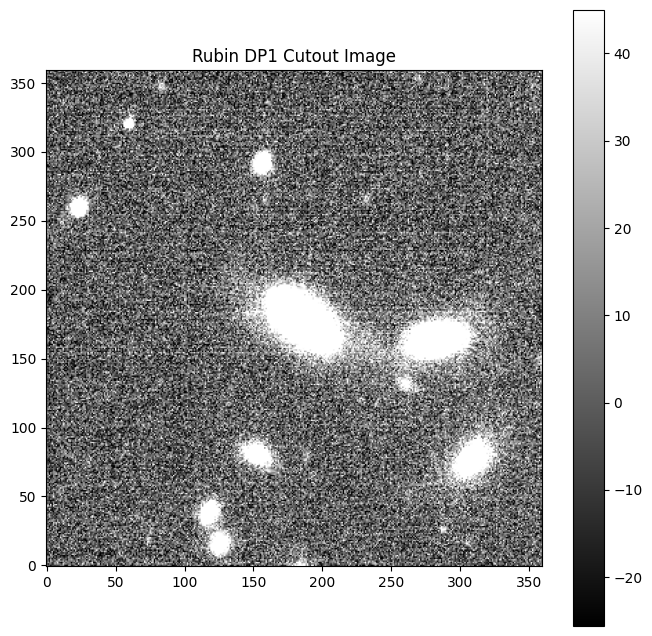
Example of a SODA cutout image.#
8. Retrieve a cutout with mask and variance planes#
To obtain the mask and variance planes in addition to the image pixels, use the cutout-sync-maskedimage service type.
Create a new SODA query with the cutout-sync-maskedimage service type and the same circular region.
sq_masked = SodaQuery.from_resource(
    dl_result,
    dl_result.get_adhocservice_by_id("cutout-sync-maskedimage"),
    session=session,
)
sq_masked.circle = (target_ra * u.deg, target_dec * u.deg, Radius)
Execute the query and inspect the FITS file structure.
cutout_bytes_masked = sq_masked.execute_stream().read()
sq_masked.raise_if_error()
hdul_masked = fits.open(io.BytesIO(cutout_bytes_masked))
hdul_masked.info()
The result contains additional HDUs for the mask and variance planes, in addition to the image pixels.
To retrieve the full set of image extensions including the PSF and provenance planes, use the cutout-sync-exposure service type instead. This mode is most useful within the RSP Notebook Aspect where the lsst.afw package can read the result as an ExposureF object (see 103.4. Cutout exposures).